GoodHolidayStore planning guide
Ophthalmic Tech Week for a Team of Four
There are four people in your clinic, and one of them is you, the accidental party planner. Celebrate Ophthalmic Tech Week with a single activity at the break table, prepared before anyone sits down. Pick the page, test the print and decide who handles the answers. Then you can join your colleagues instead of spending the entire break sorting a stack of paper while they wait.
Find a break that includes the organizer
Ask when all four colleagues can sit down
Check the available break with whoever coordinates the clinic schedule. Pick a start and finish, then clear enough space for four people to put down a page comfortably. Keep the invitation simple: one optional activity, a short thank-you and time to eat or talk.
If the team can't gather at once, plan two smaller opportunities instead. Ask the people attending what would feel useful rather than guessing from an empty calendar. Put the later invitation in writing so it doesn't disappear when the morning gets busy.
Don't add an attendance rule to a thank-you. A colleague can sit with the group without taking a page, or receive their note later if they can't stop. For a small team, those choices are especially visible, so explain the options before anyone feels obliged to fill a seat.
Select one page before you touch the printer
Read the chosen activity's instructions in full
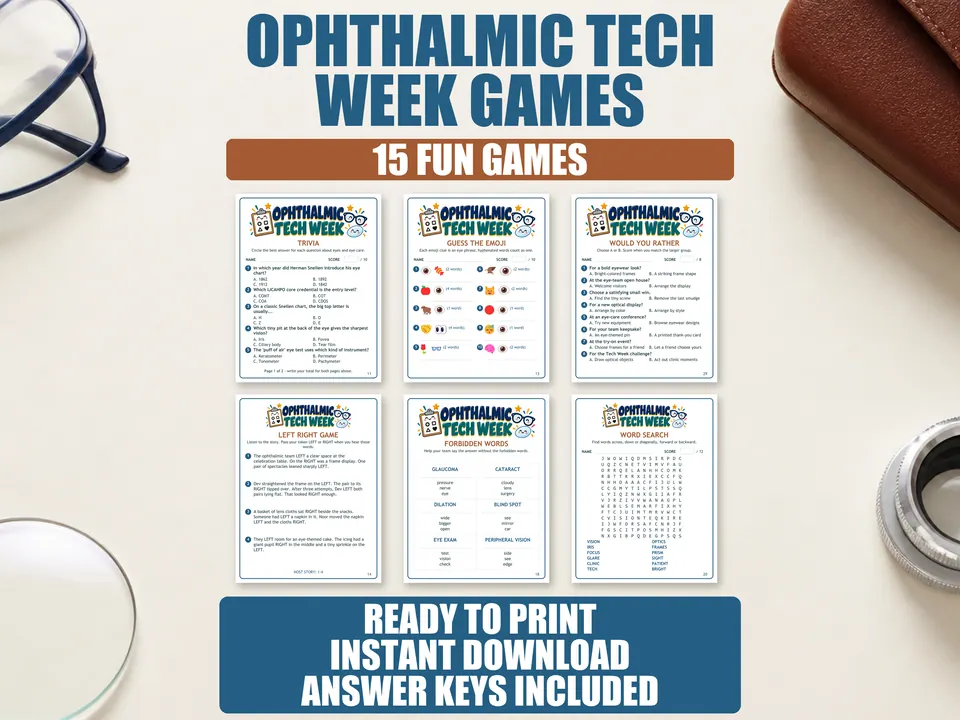
The Ophthalmic Tech Week bundle contains 15 themed activities, host instructions and answers for fixed-answer puzzles. Open the files and inspect the activities before choosing one. Read its directions to work out who needs a copy, what the host does and where the natural stopping point falls.
Look for a setup you can finish ahead of the break. If your choice needs someone to lead throughout, ask a willing colleague to share that role or select another activity. Make that decision while you have time to read, rather than handing over a page and hoping the rules become obvious.
Choose this when a themed selection and supplied hosting instructions will save you writing your own activity. You only need to run one. Keep the remaining pages for another occasion rather than presenting the small team with a menu of decisions.
For a fixed-answer puzzle, set the key aside before printing player copies. If you've already studied the answers, offer to handle the reveal and enjoy the conversation while others play. There's no need to pretend you're competing with the same information.
Make four readable copies, then stop printing
Match the PDF to your paper and test one sheet
The bundle supplies four PDF editions: A4 and US Letter full-page files of 35 pages each, plus A4 and US Letter two-up files of 18 landscape sheets each. All four contain the same activities, and the full-page editions give the largest text. Choose a single edition for your group.
Print one sample of the activity you selected. Check the text, page edges and any writing space from a seated position. Once it works, print the player copies your chosen directions require plus the host materials. Four colleagues don't need a full bundle printed four times.
Put pens within reach if your selected activity calls for them. Keep the host instructions and any answer pages separate from the player pile. A plain folder is enough; the papers need an obvious home more than they need a decorated tray.
Give the closing minutes back to the team
Explain the selected game's rules, name the finish time and let people begin. Stay available for questions without reading over every shoulder. If somebody has to leave, thank them and let them go; the remaining people can stop or continue within their own breaks.
At the end, check answers where the selected activity provides them. Keep scores private if the team prefers, and leave a moment for ordinary conversation. Don't fill every quiet second with another round.
Add a free, personal finish: write each colleague a note about one helpful thing you noticed. Deliver it directly, including to the person who missed the game. Clear the table and save the unused printed pages together, so your next small gathering begins with a usable kit rather than a mystery pile.
Questions and answers
Is this a 15-page download?
The bundle contains 15 activities, with full-page A4 and Letter editions of 35 pages each. The two-up editions use 18 landscape sheets each, and all four editions contain the same activities.
Can the organizer take part?
Choose an activity whose directions allow you to handle setup before joining. Keep fixed-answer keys out of view until the group is ready to check, and ask another willing colleague to handle the reveal if you've already seen the answers.
Can I edit the games to add our clinic name?
These are fixed PDFs rather than editable templates. Put your clinic name and welcome message on a separate sign or appreciation note.
Do we need a big team to celebrate?
Plan around the colleagues who can actually sit down and review the chosen activity's directions for that group. With four people, one shared table and a clear finish are enough; you don't need a tournament.