GoodHolidayStore planning guide
Need to Edit the Office Game or Just Print It?
You want the office party to feel like your team, and an editable game sounds like the obvious fix. Before you buy anything, work out what actually needs to change. If it's the questions, answers or points, Office Feud has editing tools. If you just want coworkers talking to each other, a fixed printable already does that. Write a short must-change list first and the right file type picks itself.
Write down the one change you can't live without
"Make it personal" can mean several things. You might want a question about your own office, real colleague names on the page, or just a welcome that fits the occasion. Only the first one means editing the game file.
Try this before comparing products: write the exact sentence or element you need to replace. If the list stays blank, you're looking for a good activity, not an editor. That saves you an evening of pointless customizing.
| Your requirement | Editable Office Feud | Fixed Office Icebreaker bundle | Fixed Coworker Connection Hunt |
|---|---|---|---|
| Replace questions, answers or points | Supported by the listing | File editing not included | File editing not included |
| Run a screen-based team game | Browser or Windows PowerPoint versions | Printable PDFs | Printable PDFs |
| Select from several activities | Two games totaling 100 rounds | 16 activities | One 20-item checklist |
| Collect personal guest responses | Spoken guesses in the game show | Depends on the selected activity | Coworkers sign matching spaces |
| Pick Letter or A4 handouts | Host answer key prints on either | Both sizes supplied | Both sizes supplied |
Follow the column that matches what you need guests to do. You can make a thoughtful welcome with any of these; the prep just happens in different places.
Office Feud: the one where you can change the round
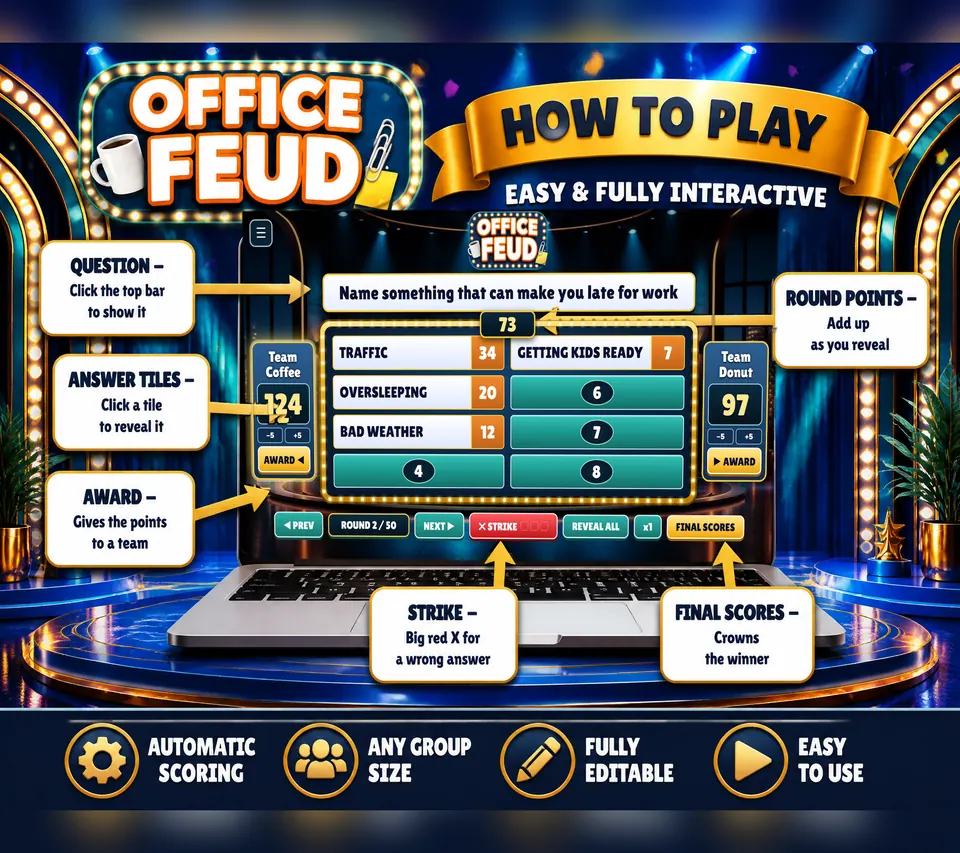
Office Feud includes 100 survey-style rounds across two games of 50. It comes as browser games and macro-enabled PowerPoint versions with the same round content. The listing explicitly permits changing questions, answers and point values, and the browser game has an on-screen editor.
Choose it when changing the content is central to your event, like a team question only your office would get, or a round you want to swap out before sharing the screen. Start with one small edit and play that round through. Don't rewrite everything at once.
Two teams guess answers, the host reveals the correct tiles and the game handles scoring. Three strikes give the other team a chance to steal. Your edit has to work inside that flow: read the question aloud, look at the answers and make sure you can host the round comfortably.
Keep team-specific questions welcoming and leave confidential details out. A question everyone understands beats an inside joke only the longest-serving colleagues get. If you have new starters, pick content they can join right away.
Check the software against the computer you'll bring
The browser version runs on Windows, Mac and Chromebook, with Chrome, Edge, Safari and Firefox named in the listing. Unzip the supplied browser games, open the HTML game and type in the two team names. Walk through the START HERE guide before guests arrive.
The PowerPoint version needs desktop Microsoft PowerPoint for Windows with macros enabled. The listing says it does not work in Google Slides, Keynote, Canva or PowerPoint Online. Pick the route your event computer supports, then rehearse on that exact machine.
Test the room too. Put the game on the real screen and stand where players will sit. Can you read the question from there? Can the host see the controls? Fixing that now beats dragging a television around while everyone waits.
Fixed bundle: someone else already wrote the games
Office Icebreaker Games contains 16 activities in four non-editable PDFs. You get Letter and A4 full-page files with 24 source pages each, plus landscape two-up versions with 13 sheets each. The four files are printing choices for the same activities.
The menu covers conversation, charades, missions, drawing and quieter puzzles. Pick an activity that already suits your group, then print its pages and directions. That's the time saved: you choose a game instead of designing one.
Full-page layouts give the largest text and writing areas. The two-up files already put mini-pages on landscape sheets, so print one PDF page per physical sheet and don't add another two-pages-per-sheet setting. A sample print will show you the border and whether the size is readable.
The listing says personalization is not included. Your own introduction or choice of activity shapes the event, but the supplied text and artwork stay fixed. If replacing that text is a must, go back to your must-change list before you buy.
Let the guests' answers make it personal
Coworker Connection Hunt has 20 checklist items. Guests mingle, find coworkers who fit the statements and collect signatures, and each coworker may sign up to two spaces. The finished sheet is personal to your gathering because it holds real names and real conversations.
The files are non-editable: a two-page US Letter PDF and a matching two-page A4 PDF. Print a copy for each participant and hand out pens. Explain the signing limit before people start moving, so they meet more than their usual neighbor.
Pick this when you want the people to supply the personal part. Your prep is a readable handout, a clear welcome and a couple of introductions to get the first chats going. If that gets you where you're headed, leave the editor closed and spend your evening on the rest of the party.
Questions and answers
Can I edit Office Feud questions and points?
Yes. The listing permits changes to questions, answers and point values, and the browser version has an on-screen editor. Rehearse the edited round on the device you'll use at the event.
Can I open the PowerPoint game in Google Slides?
No. The macro-enabled PowerPoint version needs desktop PowerPoint for Windows with macros enabled. On a Mac or Chromebook, use the supplied browser version, which supports those systems.
Does the coworker checklist let me replace statements?
No. Its A4 and US Letter PDFs are fixed and can't be personalized. Guests add colleague names to the printed sheet, which makes their responses personal without changing the file.
Do two-up files give me an editable layout?
No. Two-up only describes how pages are arranged for printing. The office bundle's PDFs stay non-editable in both full-page and two-up formats.